
Local AI agent has been working unattended for weeks now. This blog has been unattended since 2020.
Hello again! It has been a while. My previous post, about building a Xamarin iOS app in the cloud, dates from December 2020. Before that I managed 5 posts in 2011, 3 in 2012, 3 in 2014, 6 in 2017, 3 in 2018, one in 2019 and one in 2020. Statistically, my posting cadence is best described as “best described as ‘TODO: write post'”. Xamarin has since been retired, and the cloud built that app without me.
Don’t mistake the silence for idleness: I have been very busy, just not very vocal about it here. This post is about one of the things I have been working on: Beehive.
The itch
I pay for GitHub Copilot, and its premium requests are metered: use more AI than your plan allows and you buy extra credits. Meanwhile, I have a desktop at home (64 GB RAM and an RTX 4060 Ti) that is good enough to run local models through Ollama, and that sits idle most of the day.
Plenty of programming tasks are not time-pressured: “add this endpoint”, “fix that test”, “write the docs”. They can run in the background while I work on something else, or overnight while I sleep. Local models are free to use, so these tasks cost no extra credits, and I get to use a lot more AI in a month for the same money. (I have not calculated the power consumption yet; the savings may be smaller than I like to think.)
What I wanted was this:
Open a web page on my laptop, pick a repository, pick a model, type a task, and go do something else. When I come back, there is a branch waiting for me with the result.
That is Beehive: a small local-network tool that hands tasks to GitHub Copilot CLI, backed by local Ollama models, against git repositories that are checked out on the machine.
The rules of the hive
A few design decisions shape everything else:
- Agents never touch my working copy. Every session gets its own
git worktree, so the agent can make a mess without me noticing, or caring. - Always a branch, always pushed. Every task ends up on an
agent/{task}branch that is committed and pushed. Nothing lands onmainunreviewed; the pull request is where I come in. - Everything is remembered. Each session is stored: the prompt, the whole conversation, tool calls, the “thoughts” of the model, the files it changed, and the commits it made. A session can be resumed later with a follow-up prompt, continuing on the same branch.
- One at a time. There is only one GPU, so a queue runs one session at a time. Parallelism is a problem for future me.
- No accounts, no auth. Beehive never handles logins; it assumes Copilot CLI is already signed in. It is meant for my trusted home network only. (Yes, I wrote that in the docs in bold. Please do not put it on the internet.)
The architecture
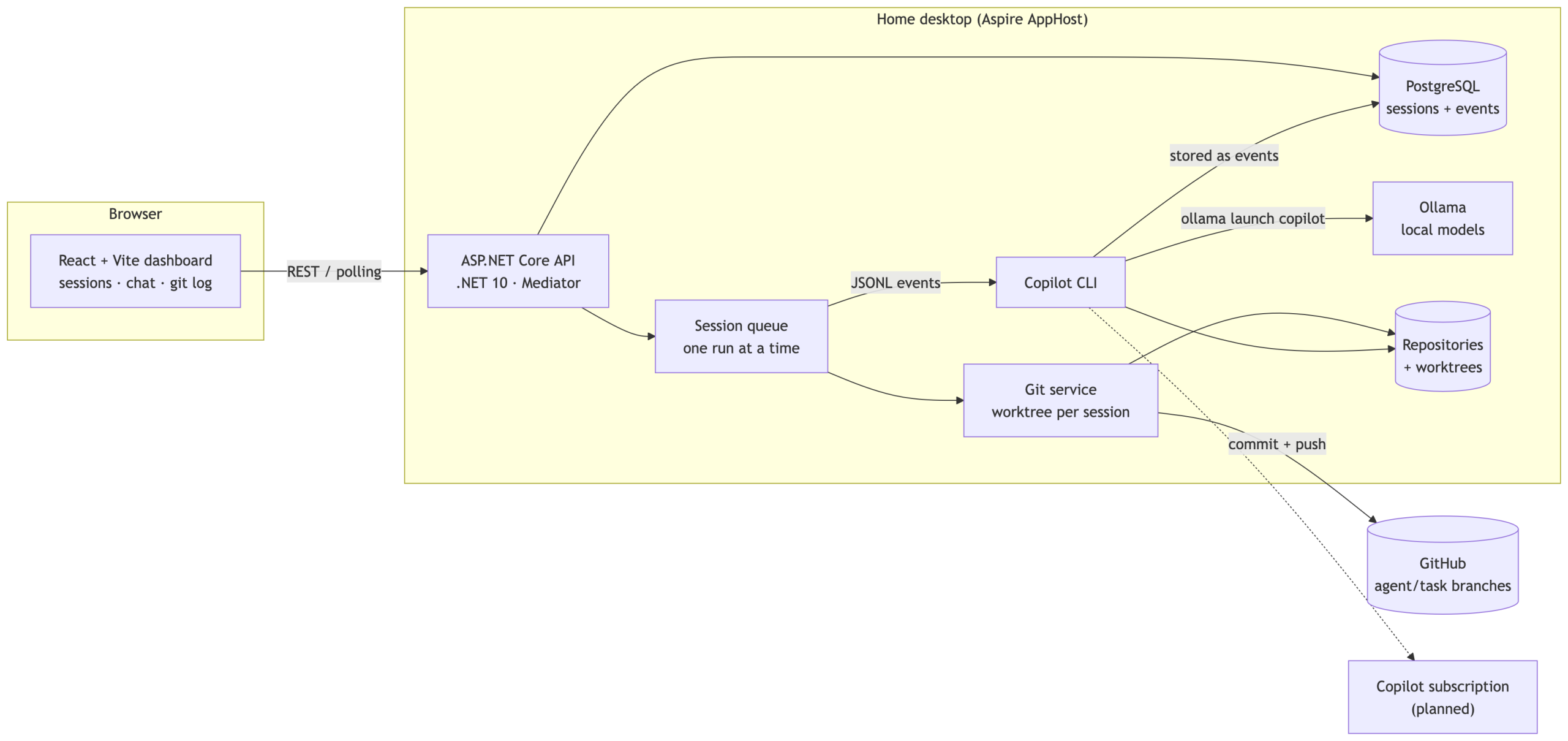
The whole thing is started by a single command: a dotNET Aspire AppHost spins up the API, the PostgreSQL container (with a persistent volume, lesson learned the hard way) and the Vite frontend, and wires the URLs together.
The life of a task
- The dashboard lists repositories (git repos under one configured root folder), models (straight from Ollama) and agents (custom
*.agent.mdfiles in the repo or my Copilot home, plus the built-in default). - I type a task and hit Run. The API stores a
Pendingsession and puts it on the queue. - The runner creates a worktree and a branch named
agent/{task-slug}, then starts Copilot CLI inside it with--output-format json. - The JSONL events stream back and are stored as they come in. The frontend polls and shows the conversation live, with thoughts collapsed, tool calls as cards, and a Stop button if the model starts going in circles (it does, sometimes; small models love repeating the same thought twenty times).
- When Copilot finishes, everything is committed and pushed. The session view then shows the files changed with diffs, and a git log for the branch.
- Not quite right? Type a follow-up and the same session is resumed in the same branch.
Built the way I would build anything
The project is a fairly strict .NET 10 codebase: controllers with one endpoint each, in REPR-style feature folders (POST /api/<area>/<feature>), Mediator (the source-generated one, not MediatR), an interface for every service, one IEntityTypeConfiguration<T> per EF Core entity, and tests with NUnit, Moq and AwesomeAssertions, all written in Arrange-Act-Assert style.
The fun part is that these conventions are written down in an AGENTS.md file, and a good chunk of Beehive was itself built by an AI agent following those rules. Every task also leaves a devlog entry (prompt, plan, changes), so there is a diary of the project, which is more than my blog can say. The docs folder holds the ideas list, the implementation plan, and a plan per larger feature, and I review each plan before anything is implemented.
What works today
- Repository, model and agent discovery
- Running Copilot CLI on a local Ollama model, in an isolated worktree, always ending on a pushed
agent/{task}branch - Persistent sessions with the full conversation, tool calls, thoughts, changed files, diffs and the branch’s git log
- Resume and stop for sessions
- A GitHub-flavored dashboard with resizable panels, markdown rendering, a backend health indicator and an Update & restart button (hidden behind a cog) that does a
git pulland restarts the whole app, so I can ship Beehive improvements to the machine under the desk without walking over to it
What is next
- Telemetry: Copilot CLI can export OpenTelemetry data. I want tokens, tool calls, durations and lines changed per session, perhaps with Prometheus for long-term trends. I already researched this, and the answer is “yes, but it is a complement to the raw JSONL, not a replacement”.
- Changing model and agent when resuming a session.
- Custom models from Hugging Face, so I’m not limited to what is in the Ollama library.
- Parallel sessions, once I figure out what to do with a single GPU.
Why bother?
Mostly because I wanted to see how far you can get when the agent does the typing and I do the thinking, reviewing and deciding. Beehive turns that into a workflow: small tasks go in, branches come out, and I stay in charge of what actually gets merged. Also, a name like Beehive makes the whole thing sound far busier than it is.
I will try to write more about it as it grows. Given my track record, you may want to set a reminder for 2032.